
Introduction
The key feature and significant advantage of the docuRob®WorkFlow system is its flexibility and high level of adaptability. This enables the implementation of complex real-world processes that operate in a dynamic environment and often require adaptation to changing surroundings.
Flexibility and adaptability of processes in the docuRob®WorkFlow system are ensured by combining the power and standard way of working offered by business process management with the flexibility and expressiveness of the rule management mechanisms. In this approach, the standard process is driven by rules that can be defined in its controling elements. Thanks to this, high efficiency of the rule mechanisms is achieved while ensuring high process flexibility.
In the docuRob®WorkFlow system , the rules management mechanism is based on the docuRob® Business Process Query Language (BPQL), the capabilities of which result from, among others, the following features of the scripting language:
- enables operation (definition of queries) on the complete metamodel of business processes. In practice, this means that it is possible to define queries that use information about the process definition as well as the data from its execution logs..
- In BPQL, one can write a query that will designate the performer of an activity based on the requirements of having the same supervisor as the performer of the previous activity, having specific competencies, being employed in the appropriate position, and having the fewest currently assigned tasks.
- a simpler way of working with lists (sets) of data, which is the most frequently used element in the case of selecting activity performer.
- BPQL environment provides for extending the Built-in functions library to support the domain- specific design and implementation of business processes. Both the process ontology model and the terminology and algorithms of the functions can be implemented also by authorized users of the docuRob®WorkFlow platform .
Data types
BPQL provides a strong typing and type checking mechanisms. Currently, the following simple types are supported:
- String – any text string. The text string can contain any characters enclosed in apostrophes. Examples: " alabama ", " ala bama ”, “ Spare parts ”, “ Part No. #234 ",
- Integer – whole value. Examples: -123, 345, 0,
- Double – real value. The sign separating the integer part from the fractional part is the character "." Examples: 123.56, -23.67,
- Timestamp – date and time. When entering constant values, only dates can be entered. Allowed date formats are: YYYY-MM-DD and YY-MM-DD (where: Y- year digit, M- month digit, D- day digit). Examples: 2001-01-01', '2008-07-23',
- Boolean - logical value. Allowable values are: true and false. Note, case is important.
In addition to the simple types, there are also three complex types:
- Binary – represents a file not interpreted by the docuRob®WorkFlow system . It may be a file of any format that is, as part of the process, passed between activities.
- Document – a complete XML document (file) that can be interpreted by the rules available in BPQL.
- Node – a fragment of an XML document (also a file) representing an XML node that can be interpreted by the rules available in BPQL.
Comments can be added anywhere in a BPQL expression . To start a comment , use the symbol "/*". To end a comment, use the symbol "*/". Usage examples are given in the following sections.
Global Process Variables - Container Attributes
BPQL expressions can use process variables stored in the data container . Process-level variables are used to store data that controls flows or is processed by the process.
To use a variable in a BPQL expression, you must precede its name with the "$" character.
$<variable_name>
In case the global variable is multi-valued, the reference to its n-th element can be realized using the GetMultiValueAttribute function
Examples of variables
$attr1
$accept_in
Collections
One of the key elements of BPQL are sets and operations on them. In BPQL, a set is a group of named elements of the same simple type. Elements in a set can be repeated.
Most of the functions available in BPQL return a result in the form of a set. To create a set "manually", use the following syntax:
[<element1>, <element 2>, ... , <element n>]
Examples of collections
['aa', ' bb ', 'cc']
[true, false]
Operators
Operators are another basic element of the BPQL. Below, the individual groups of operators are classified and described.
Logical
There are three logical operators available:
- NOT or the '~' sign – logical negation, the negated expression must be in brackets,
- AND – logical product,
- OR – logical sum.
Usage examples
($x=5) AND ($y='approved')
is true when global variable x has value 5 and global variable y has value 'approved'
IF (~($test3)) THEN
['user1'];
if the variable test3 is false, then the expression will return a single-element set with the user user1.
Arithmetic
BPQL defines basic arithmetic operators. These operators operate on Integer and Double data types. These are the following operators:
- '+' sum operator
- '-' difference operator
- '*' multiplication operator
- '/' division operator
Example of use
IF ($x = 2* $y + 3) THEN
['user1'];
is true when the global variable x has a value that is three times greater than the value of the variable y.
Comparison operators
BPQL defines all standard comparison operators:
- '=' equal
- '>' greater than
- '>=' greater than or equal to
- '<' less than
- '<=' less than or equal to
- '<>' different
Comparison operators are available for the following simple types: Integer , Double , Timestamp , and String . For text, the less than and greater than operators work in the standard way as in common programming languages.
Example use
IF (($x = false) AND ($data < 2008-01-01)) THEN
['user1'];
ELSE IF (($x = true) AND ($value <= 1000)) THEN
 ['user2'];
ELSE
['user3'];
If the value x is false and the application date is earlier than 2008 then return the performer user1 as the result . Otherwise check if the value x is true and if the delegation value is greater than PLN 1000. If so then return the performer user2 . Otherwise return the performer user3 .
Actions on collections
The next set of operators are the set operators. There are three basic operators available in BPQ:
- '/\' product of sets.
- '\/' the union of sets
- \ difference of sets
Example of use
UsersFromList ( DepartmentUsers ('100419542')) /\ WM_Fun_hasPosition (' Specialist ')) \ ['user12']
Select all secretaries working in the organizational unit with id '100419542' other than user12 .
Order of execution of operators and parentheses
In BPQL, the order of operator execution is the same as in a standard programming language. This order is shown in Table 1 . To change this order, use parentheses "( )".
| Operators (from highest priority) |
|---|
| Algebraic product and quotient operators |
| Algebraic sum and difference operators |
| Substitution operator |
| Set product operator |
| The union and difference operator of sets |
| Comparison operators |
| Logical operator of negation |
| Logical product operator |
| Logical sum operator |
Table 1. Operator execution priorities in BPQL
If there are several operators with the same precedence, they are grouped starting from the left. An example of checking how the order of operators works.
Expression:
$x := 4 + $y * $w – 45 / $k
is equivalent in BPQL to the following expression:
($x := (4 + (($y * $w) – (45 / $k))))
Instructions
Another important element of BPQL are instructions . The basic instruction is the substitution instruction , i.e. assigning a value to a variable . In order to group several instructions, so-called instruction blocks can be used . Instructions also allow defining control flow ( conditional instructions ) and mass processing (loop instructions). Additionally, it is possible to define variables related to a given block of instructions .
Substitution instruction
In BPQL, the substitution operator is represented by the symbol ":=". This operator performs assignments to variables of any simple type and complex types : Document and Node . Thanks to this operator, it is possible, for example, to define process metrics such as the number of iterations of a given path (cycle).
The syntax of the substitution statement is as follows:
$<variable name> := <substitution expression>;
Example of use
$number_of_iterations := $number_of_iterations + 1;
This substitution, placed in the pre-action of a given activity, increases the counter of the number of modifications made to the document by 1 before its approval (the number of loop cycles concerning modifications).
Note : Each substitution statement must end with a semicolon!
Instruction blocks
Statement blocks combined with conditional statements allow for the flexible definition of more complex business rules for the process. This is especially useful for pre- and post - action rules activities .
The syntax of an instruction block is as follows:
						{
							<instruction 1>
							<instruction 2>
							...
							<instruction N>
						}
Example of use
Let us extend the last example by increasing the risk (probability) of not making a decision by 10% (assuming the current risk is < 90%).
{
	$ number_of_circulations := $ number_of_circulations + 1;
	no_decision_trial := $ no_decision_trial + 0.1;
}
Block statements can be nested. Each statement inside a block of statements can also be a block of statements.
Local variables
Local variables allow one to define variables at the level of individual rules (performer assignment, transition condition, pre and post action) and instruction blocks .
A variable declaration has the following syntax:
<simple_type> <variable name> ;
As for < simple type >, the simple types defined in BPQL are allowed . If the variable name clashes with an existing name, this will not be detected during the process definition and will only be reported as an error during the execution.
Example of use
Integer x;
{
$x := 5;
Integer y;
{
$y := $x;
Integer from;
{
$z := $y;
}
}
}
Conditional instruction
To allow for the introduction of conditions in BPQL expressions, conditional statements were introduced. The syntax of this statement allows for two options:
	IF ( <logical condition>) THEN
		<instruction when true>

	IF ( <logical condition>) THEN
		<instruction when true>
	ELSE
		<instruction when false>
The meaning of this statement is as follows: if < logical condition > is true , then < statement if true > is executed . Otherwise, if an ELSE clause is defined, < statement if false > is executed. The statement can be either a simple statement , a block statement , or another conditional statement .
Note : Please remember that the conditional expression must be enclosed in brackets!
Example of use
In our previous example, we will check if the risk value exceeds the appropriate thresholds after updating. If the risk is greater than 50%, we will set the variable Owner_notification_required (process). If the value exceeds 80%, we will additionally set the variable Supervisor_notification_required .
	{
		$ number_of_circulations := $ number_of_circulations + 1;
		IF ($ nodecision_prob < 0.9) THEN {
			$ nodecision_trial := $ nodecision_trial + 0.1;
			IF ($ nodecision_prob > 0.5) THEN
				$ required_owner_notification := true;
			IF ($ nodecision_prob > 0.8) THEN
				$ required_notification_from_supervisor := true;
		} ELSE
			$ no_decision_prob := 1.0;
}
For Loop
The loop is a basic statement for handling repetitive operations performed on an indexed data group . The syntax of this statement is as follows:
	FOR ( <condition>; <increment>)
		<instruction>
The meaning of this instruction is as follows: perform the action < statement > (also block statement ) until < condition > is true. After each execution of the action, execute the < increment > instruction.
To use the loop, you need to supplement it with:
- declaration of a counter variable , used in the loop condition. This variable can be local or global .
- assign an initial value to a variable
Additionally, remember that the <increment> instruction is used to appropriately modify the counter variable in the loop. This instruction may not appear in the FOR statement declaration, then you only need to add the ';' character at the end of the condition.
Example of use
We assume that we have a multivalued variable defining the decisions made by individual evaluators of a given application. The number of evaluators depends on a given application (process instance) and is stored in the global variable $ number_of_evaluators . The ratings are stored in the global variable $ ratings of integer type (acceptable values from 1 to 5). Each of the individual ratings is stored under a key that is a natural number from 1 to $ number_of_evaluators . In our example, we will determine the final rating that is the average of all individual ratings and store it in the global variable $ final_rating .
/*
For the example to work, you need to define
the following global variables:
number_of_evaluators Integer
evaluation Integer multivalued
final_rating Double
*/
Integer i; /* counter variable */
Integer sum; /* calculating the sum of partial grades */
/* setting initial values */
$i:=1;
$sum := 0;
FOR ($i:=0; $i < $number_of_raters; $i:=$i+1) {
/* add individual values to the sum */
$sum := $sum +
String2Int(GetMultiValueAttribute('rating', Int2String($i)));
}
/* calculate the final grade as the average of the individual grades */
$final_rating := $sum / $number_of_raters
On line 16 we use three built-in BPQL functions:
- GetMultiValueAttribute - to read the unit rating value stored under the key $ i . The read value is in text form (not numeric).
- Int2String – to convert a counter variable to a text representation of the key in a multivalued attribute $ evaluation . The key in a multivalued attribute is always text.
- String2Int – to convert the read value of a multi-value attribute from text to numeric.
While loop
Another variation of the loop is the WHILE loop. The syntax of this statement is as follows:
	WHILE ( <condition>)
		<instruction>
The meaning of this statement is as follows: perform the action <statement> (also a block statement) until <condition> is true. Unlike the FOR statement, in this statement the <increment> can be included in any part of the action <statement>.
Example of use
Our averaging example would look like this:
/*
For the example to work, you need to define
the following global variables:
number_of_evaluators Integer
evaluation Integer multivalued
final_rating Double
*/
Integer i; /* counter variable */
Integer sum; /* calculating the sum of partial grades */
/* setting initial values */
$i:=1;
$sum := 0;
WHILE ($i < $number_of_raters) {
/* add individual values to the sum */
 $sum := $sum +
 	String2Int(GetMultiValueAttribute('rating', Int2String($i)));
 $i:=$i+1;
}
/* calculate the final grade as the average of the individual grades */
$final_rating := $sum / $number_of_raters
Built-in functions
The element that allows for flexible expansion of BPQL functionality are functions. Currently, BPQL has a set of over 100 Built-in functions . Additionally, each application using the platform can add its own domain-specific functions . Hence, in a specific implementation, the language functionality can be flexibly expanded with new functions.
In BPQL functions can be nested. One function can be a parameter of another and that function can be a parameter of a third function. The syntax for using a function is as follows
<function name>( <parameter1>, <parameter2>, ..., <parameterN>)
The function name is a sequence of letters, numbers, and underscores, starting with a letter.
The following sections describe the individual functions built into BPQL. For each function, a specification is provided, along with a description of its meaning, and, for more complex functions, an example of use.
These functions allow one to perform explicit conversions on data of different types.
Functions for operating on process history and modifying time constraints
BPQL provides a set of functions that provide for complex analysis of process instances and the data from their execution. The created rules can be based not only on current attribute values , but also on historical and quantitative information related to, for example, completed or ongoing activity instances. Additionally, there is a feature of dynamic modification of time constraints related to individual activities or the process itself.
ChangeActDeadline
The function that changes the end date of a given activity instance – takes two parameters: the activity number or the activity instance identifier and the new end date of the activity instance; returns the newly set end date. The function syntax is as follows:
Timestamp ChangeActDeadline (String actNo|actInstId , Timestamp newDeadline )
ChangeProcDeadline
The function that changes the end date of a process instance – takes one Timestamp type parameter, returns a newly set date. The function syntax is as follows:
Timestamp ChangeProcDeadline(Timestamp newDeadline)
ChangeStoperDeadline
A function that allows for very flexible and time-variable setting of the waiting time of the Timer type activity based on the following parameters: initial waiting time ( initDeadline ), iteration after which the waiting time should start changing ( startIdx ), after how many executions the waiting time should change ( iterRange ), by how much the waiting time should change ( deadlineInc ), limit (maximum) waiting time ( maxDeadline ). The values of all parameters are expressed in milliseconds. The function syntax is as follows:
Integer ChangeStopperDeadline (String initDeadline , String startdx , String iterRange , String deadlineInc , String maxDeadline )
ChangeStoperDeadline function can only be used in the definition of an activity of the Timer type - example:
ChangeStopperDeadline('5000', '3', '2', '1000', '15000');
The first, second, and third executions of the Timer action will wait 5 seconds, the fourth and fifth 6 seconds, the sixth and seventh 7 seconds, etc. The waiting time will increase up to 15 seconds. After this limit is reached, each subsequent execution will wait 15 seconds.
SetAlertTimeForNotOpenedActivities
The function allows one to set the maximum waiting time for the performer to take action (open a task) within the current process instance. If the performer does not take the task within such a specified time, the system will generate an event of the type: ACTIVITY_INST_OPEN_TIME_EXCEED, which can be used to. send information reminding the respective performer about the waiting task. The function parameter is the waiting time expressed in minutes . The function syntax is as follows:
SetAlertTimeForNotOpenedActivities (Integer timeToWait )
Example :
SetAlertTimeForNotOpenedActivities (240);
For each action not taken in the current process instance - after 4 hours (240 minutes) from its creation - an event about the task not taken will be generated.
WM_Fun_FirstAct
The function returns the identifier of the first instance of the activity. The syntax of the function is as follows:
String WM_Fun_FirstAct ()
Performer support features
One of the basic categories of BPQL functions is a set of functions for handling performers . This set allows for selecting candidates to perform tasks in terms of belonging to the organizational structure, competences held, roles played and other organizational dependencies. The provided BPQL functions operate in the context of employees not only on system users. This means that these functions support a model in which one person can work in many organizational units (organizational cells) and can be perceived in the organization as several employees. Consequently, such a person, as separate employees, participates in assigned and performed tasks.
Most of the functions for handling performers return a set of employees as the result of their operation. In order to better verify expressions that process such sets, a specialization of the set of performers has been defined in BPQL. It is written as SET<Participant>. This type is treated as separate from the SET type. In addition, a composite type Participant has been introduced to represent a given employee.
The individual functions are described below.
ActivityPerformer
The function returns a list of employee identifiers who performed the activity with the given number ( activityNo). The function syntax is as follows:
String ActivityPerformer (String activityNo )
AllCurrentPerformer
The function returns the performers that are assigned to at least one currently executing task in the current process instance .
The function syntax is as follows:
SET<Participant> AllCurrentPerformer ()
AnyParticipant
The function returns all potential Workflow performers. The function syntax is as follows:
SET<Participant> AnyParticipant ()
CollectUsers
The function returns a list of user IDs created by concatenating the two lists passed, excluding duplicates. The ID is the user account. The function syntax is as follows:
String CollectUsers (String userAccountIdList , String userAccountIdList )
CurrentPerformer
This function returns as a result the employee who is performing the current activity . When this function is used in a transition condition , it returns the performer of the activity instance that is the beginning of the given transition. As a result, a single-element set with the Participant object is returned . The function syntax is as follows:
SET<Participant> CurrentPerformer ()
DelayedActivitiesPerformer
The function returns a set of performers of delayed activities in a given process instance that are currently assigned or are being executed . If, in addition, the entire process instance is delayed, then all performers of currently executed tasks are returned . The process instance identifier is given as an argument to the function. If we want to obtain information for the currently executed process instance, then we pass ThisProcessInst () as an argument to the function . A set of objects of type Participant is returned as the result . The function syntax is as follows:
SET<Participant> DelayedActivitiesPerformer ()
Department Experts
The function returns a list of employee identifiers with a specific competence in the given organizational units. The first parameter is the competence identifier ( competenceIdentifier ), the second parameter is a list of cells in the form of a list of numeric identifiers of organizational units ( orgUnitIdList ). Syntax the function is as follows :
String DepartmentExperts(String competenceIdentifier , String orgUnitIdList)
DepartmentUsers
The function returns a list of employee identifiers belonging to the specified organizational units. The parameter is a list of cells in the form of a list of numeric identifiers of organizational units ( orgUnitIdList ). The function syntax is as follows:
String DepartmentUsers (String orgUnitIdList )
ExpertsFromDep
The function selects people with the specified competence within the specified organizational units (and all their sub-units ). The first parameter is the competence identifier, the second parameter is a list of organizational units in the form of a list of numerical cell identifiers (IDs). The last parameter indicates whether an additional search should be performed within parent units (value 'true') or not (value 'false'). If the last parameter of the function has the value 'true', the search is performed across parent units up to the root . The function syntax is as follows :
SET<Participant> ExpertsFromDep (String competenceIdentifier , String orgUnitIdList , String searchUp [' true','false '])
ExpertsFromOU
The function selects people with the specified competence within the entire organizational unit (company). The first parameter is the competence identifier ( competenceIdentifier ), the second parameter is the numeric identifier (ID) of the organizational unit ( companyId ). Syntax the function is as follows :
SET<Participant>ExpertsFromOU(String competenceIdentifier ,String companyId)
GetDepIdFromUser
The function returns the numeric identifier of the organizational unit based on the numeric identifier of the employee ( userAccountId ). The syntax of the function is as follows:
String GetDepIdFromUser (String userAccountId )
GetParentDepartmentId
The function returns the parent cell identifier. The function parameter is the numeric identifier of the organizational cell. The function syntax is as follows:
String GetParentDepartmentId (String orgUnitId )
GetProcessInstanceOwner
The function returns a single-element set representing the employee who owns the executing process in the context of which the function was used. The syntax of the function is as follows:
SET<Participant> GetProcessInstanceOwner ()
HasCompetence
The function returns a logical value: true if any of the employees indicated in the parameter has the specified competence, false – otherwise. The first parameter is a list of employee numeric identifiers ( userAccountIdList ). The second parameter is the competence identifier ( competenceIdentifier ). Syntax the function is as follows :
Boolean HasCompetence(String userAccountIdList ,String competenceIdentifier)
LeastLoadedPerformerCtx
This function selects from the set of employees (type SET<Participant>) given as an argument to the function the employee who has the smallest current load . This load is counted in the number of currently assigned tasks per employee. As a result, an object of type Participant is returned . The function syntax is as follows:
Participant LeastLoadedPerformerCtx (SET<Participant> candidates)
Participant
The function allows for the so-called "manual" creation of an object representing a given employee in the form of a Participant object . The following should be passed as arguments to the function:
- employee login
- attr1 attribute value – this attribute may have a specific meaning in individual systems using docuRob® WorkFlow . Most often it represents the identifier of the organizational unit in which a given employee works
- attr2 attribute value – this attribute may have a specific meaning in individual systems using docuRob® WorkFlow . Most often it represents the identifier of the organizational unit in which a given employee works
If you don't want to provide the values of attr1 and attr2, you should provide an empty string. The function syntax is as follows:
Participant Participant(String login, String attr1, String attr2)
ParticipantsList
The function returns a list of employee IDs based on a list of performers. The function syntax is as follows:
String ParticipantsList (SET<Participant>)
SelectRandomParticipantCtx
The function randomly selects N employees from the set given as the function argument and returns them as a set of Participant objects . The function syntax is as follows :
SET<Participant> SelectRandomParticipantCtx (SET<Participant> candidates, String numberToReturn)
Subordinates
The function returns a set of employees who are direct subordinates of the employees given as an argument to the function. The function parameter is a list of numeric employee identifiers ( userAccountIdList ), for which subordinates are searched. As a result, a set of objects of type Participant is returned . The function syntax is as follows:
SET<Participant> Subordinates(String userAccountIdList )
SupervisorCtx
The function returns as a result the employee who is the direct superior of the employee given as an argument to the function. An object of type Participant is returned as a result . The function syntax is as follows:
Participant SupervisorCtx (Participant worker )
UserHasRoleInDep
This function returns as a result a set of employees performing a specific role in the organizational unit. The role identifier ( roleInDepIdentifier ) is passed as the first parameter of the function. The second parameter is a list of organizational units in the form of a list of numeric cell identifiers ( OrgUnitIdList). As a result, a set of objects of type Participant is returned . The function syntax is as follows:
SET<Participant> UserHasRoleInDep(String roleInDepIdentifier, String OrgUnitIdList );
UserHasRoleInWorkgroup
This function returns as a result a set of employees performing a specific role in a workgroup . The role identifier ( roleInWorkgroupIdentifier ) is passed as the first parameter of the function. The second parameter is a list of workgroups in the form of a list of numeric identifiers ( workgroupIdList ). As a result, a set of objects of type Participant is returned . The function syntax is as follows:
SET<Participant> UserHasRoleInWorkGroup (String roleInWorkgroupIdentifier , String workgroupIdList )
UserId2Login
The function reads the user's login based on their identifier in the system. The function syntax is as follows:
String UserId2Login(String userId)
UsersFromList
The function returns the Workflow performers based on the list of numeric employee identifiers ( userAccountIdList ). The function syntax is as follows:
SET<Participant> UsersFromList (String userAccountIdList)
If the functions return lists of employee IDs, then to use them to determine task performer you should call them as parameters to the UsersFromList () function , e.g.
UsersFromList ( DepartmentUsers ('100419542'))
WM_Fun_ActivityLastPerformer
This function selects the employee who was the last to perform the activity or activity instance given as the function argument. The function automatically checks whether the activity identifier or activity instance identifier ( task ) was given. The function selects from the list of performers of activity instances that are currently being performed or were performed in the past and completed successfully. Performers who participated in interrupted activities are not taken into account. In the case where the activity identifier was given, more than one employee (multiple instances) may be considered as the last performer. In such a case, the system randomly selects one of them and returns it as the result. The result is a single-element set SET< Participant >. The function syntax is as follows:
SET<Participant> WM_Fun_ActivityLastPerformer (String activityId )
WM_Fun_ActivityOwner
The function returns a set of all performers of an activity (set of employees ) or an activity instance ( task) given as an argument to the function. The function automatically checks whether an activity identifier or an activity instance identifier ( task ) was given. The function removes duplicate performers (e.g. in the case of a loop) from the returned set. The function syntax is as follows :
SET<Participant> WM_Fun_ActivityOwner (String activityId)
WM_Fun_Any
The function returns a set of all employees of the organization . As a result, a set of objects of type Participant is returned . Due to the size of the returned set, the function should not be used in a production installation. The function can only be used for testing purposes when starting the process. The syntax of the function is as follows:
SET<Participant> WM_Fun_Any ()
WM_Fun_hasPosition
This function returns as a result a set of employees working in a given position , whose name (or identifier) is passed as an argument to the function. As a result, a set of objects of type Participant is returned . The function syntax is as follows:
SET <Participant> WM_Fun_hasPosition (String positionName)
Usage examples
The purpose of this section is to present basic examples of how to use the performer handling functions. These examples are elements of performer selection rules.
/* Selecting performer by organizational structure */
UsersFromList ( DepartmentUsers ('100419542'))
/* All employees from org. cell with numeric ID '100419542' */

/* Selecting performer by positions */
WM_Fun_hasPosition ('Specialist')
/* All employees employed in the position of secretary*/

/* Secretaries in organizational unit with ID '100419542' */
UsersFromList ( DepartmentUsers ('100419542')) /\ WM_Fun_hasPosition (' Specialist ')

/* Supervisor of the first activity performer */
SupervisorCtx ( WM_Fun_ActivityOwner ('1'))
Data conversion functions
Data conversion functions allow you to perform explicit conversions between data types wherever: a) you do not want to use implicit conversions, or b) there are no implicit, automatic conversions of such types.
BinaryToBase64
The function saves a binary file in Base64 encoding and returns it in processed form as text. The function syntax is as follows:
String BinaryToBase64( Binary file)
BinaryToHex
The function writes a binary file in hexadecimal encoding and returns it in a processed form as text. The function syntax is as follows:
String BinaryToHex ( Binary file)
Boolean2String
The function creates a text representation of the logical value passed as an argument to the function. If the argument is true, the text true is returned . If the argument is false, the text false is returned. The function syntax is as follows:
String Boolean2String(Boolean value)
Date2String
The function creates a text representation of the date passed as an argument to the function. If the date is valid, a string in the format YYYY-MM-DD HH24:MI:SS is returned, for example 2008 0725:07:45:12. The function syntax is as follows:
String Date2String( Timestamp value)
Doc2String
The function creates a text representation of the XML document passed as an argument to the function. The syntax of the function is as follows:
String Doc2String( Document doc)
Double2String
The function creates a text representation of the real value passed as an argument to the function. The syntax of the function is as follows:
String Double2String( Double value)
Int2String
The function creates a text representation of the integer value passed as an argument to the function. The syntax of the function is as follows:
String Int2String( Integer value)
Node2String
The function creates a text representation of an XML document node (so-called node element) passed as an argument to the function. The function syntax is as follows:
String Doc2String( Node node )
String2Boolean
The function creates a logical value from the text passed as an argument to the function. If the representation of the function argument as a string of written (not printed) letters is the text " true ", then the function returns true . Otherwise, the function returns false . The syntax of the function is as follows:
Boolean String2Boolean( String value)
String2Date
The function creates a date based on the text passed as an argument to the function. The text must conform to the format: YYYY-MM-DD HH24:MI:SS, for example 2008 0725:07:45:12. The function syntax is as follows:
Timestamp String2Date(String value)
String2Doc
The opposite of the previous function. Given a text representation passed as an argument to the function, parses it and creates an XML document .
Document String2Doc( String doc)
String2Double
The function creates a real number based on the text passed as an argument to the function. The fractional part is separated by the character "". The syntax of the function is as follows:
Double String2Double(String value)
String2Int
The function creates an integer based on the text passed as an argument to the function. The syntax of the function is as follows:
Integer String2Int(String value)
String2Node
The inverse of the previous function. Given the text representation passed as an argument to the function, parses it and creates an XML document node .
Node String2Doc(String doc)
Text processing functions
Text processing functions allow you to perform advanced operations on data of type String . In all functions, if a reference is made to a position in text , the position is given as text, not as a number. Positions in text are counted from 1 to a value equal to the length of the text.
CharAt
The function returns the character (as a text of length 1) located at a specified position in the text data given as an argument to the function. The function syntax is as follows:
String CharAt ( String text , String position )
EndsWith
The function checks whether the given text ends with the string of characters given as the second argument of the function. If so, the value true is returned . Otherwise, the value false is returned . The syntax of the function is as follows:
Boolean StartsWith( String text, String finalText )
IndexOf
The function returns the position of the first occurrence of a given string in the text given as the first argument of the function. The syntax of the function is as follows:
Integer IndexOf (String text , String search )
LastIndexOf
The function returns the position of the last occurrence of a given string in the text given as the first argument of the function. The syntax of the function is as follows:
Integer LastIndexOf ( String text , String search )
Length
The function returns the length of the text supplied as an argument to the function . The syntax of the function is as follows:
Integer Length ( String text )
LowerCase
The function returns a representation of the text supplied as a function argument where all letters appearing are converted to lowercase letters. The function syntax is as follows:
String LowerCase ( String text )
Combining texts
To combine texts, simply use the '+' operator.
The following example summarizes the text processing functions and shows how they can be used.
/* declaration of local variables */
String s;
String s1;
Boolean b;
Integer 1;
$s := 'test, test123, testing , Testing5 ';
$s1:=CharAt($s, '1'); /* s1='t' */
$b := StartsWith ($s, 'test'); /* b=true */
$b := StartsWith ($s, 'testing5'); /* b=false*/
$s := Trim($s); /* s = 'test, test123, testing , Testing5' */
$b := StartsWith ($s, 'testing5'); /* b=false*/
$s := LowerCase ($s); /* s = 'test, test123, testing, testing5' */
$b := StartsWith ($s, 'test5'); /* b=true*/
$s := Replace ($s, 'test', 'missing'); /*s='missing, missing123, missing, missing5'*/
 $s:= Set2String(Split($s, ', ', '0'), '#');
 /*
after split ['missing', 'missing123', 'missing', 'missing5']
s='missing# missing123# missing# missing5'
*/
 $s := Set2String(Split($s, ', ', Int2String(2), '#');
 /*
after split ['missing', 'missing23, missing, missing5']
s='missing# missing123, missing, missing5'
*/

$s:='12345';
$l := Length($s) /* l=5 */
$s1:= Substring($s, 2, 4); /* s= '34' */
$s:='1234512345';
$l:= IndexOf ($s, '45'); /* l = 3 */
$l:= LastIndexOf ($s, '45'); /* l = 8 */
Replace
The function returns a text with all occurrences of the string given as the second argument of the function replaced with the string given as the third argument of the function . The syntax of the function is as follows:
String Replace(String text, String find, String replace)
Split
The function divides text into fragments . A fragment is a text that is contained between the separators. The separator is a string of characters given as the second argument of the function . The fragment ends before the next occurrence of the separator or at the end of the entire text. If the text does not contain any separator, one fragment containing the entire text is returned. Additionally, the third parameter specifies the maximum number of fragments in the resulting set . If it is possible to divide the text into a larger number of fragments than the limit, the text will be divided into only as many fragments as specified in the third parameter, and the entire text will be used. The value '0' of this parameter means no limit . The fragments are returned as a set. The function syntax is as follows :
SET Split(String text, String expression, String count)
StartsWith
The function checks whether the given text starts with the string of characters given as the second argument of the function. If so, the value true is returned . Otherwise, the value false is returned . The syntax of the function is as follows:
Boolean StartsWith( String text, String initialText )
Substring
The function returns a text of length ( endIndex – beginIndex ) that is part of the text supplied as an argument to the function starting from the beginIndex position and ending at the endIndex-1 position . The function syntax is as follows:
Boolean Substring( String text, Integer beginIndex , Integer endIndex )
Trim
The function returns a representation of the text supplied as an argument to the function, without leading or trailing spaces . The function syntax is as follows:
String Trim (String text )
UpperCase
The function returns a representation of the text supplied as a function argument in which all occurring letters are converted to capital letters . The function syntax is as follows:
String UpperCase ( String text )
Collection processing functions
In BPQL, there are several basic functions operating on sets . These functions allow processing of individual elements of the set. In the function syntax, the set is given as a SET type.
Bag
This function allows you to convert a list of elements to a set . The elements are passed as subsequent arguments to the bag function . The elements must be of the same type. All simple types and the Participant type are allowed . The number of arguments can be any integer greater than zero. Since this is a function closely related to the language, its name is written in lowercase. The syntax of the function is as follows:
SET bag( <type> el1, <type> el2, ..., <type> elN )
GetElement
The function returns an element of the set (given as the first argument of the function) that is at the position given as the second argument of the function. The element is returned as text. The syntax of the function is as follows:
String GetElementAsString ( SET set , Integer position)
GetSizeOf
The function returns the number of elements in the set given as the first argument of the function. The syntax of the function is as follows:
Integer GetSizeOf ( SET set)
IsEmpty
The function checks if the given set is empty . If so, it returns true . Otherwise, it returns false . The syntax of the function is as follows:
Boolean IsEmpty ( SET set)
Set2String
The function stores the value of a set (all of its elements) in the form of text . The elements of the set are separated by the character given as the second argument of the function. If the character is an empty element (i.e. ''), then the default separator is assumed. The syntax of the function is as follows:
String Set2String( SET set , String separator)
Thanks to this function it is possible to save sets in process variables for further processing.
String2Set
The function converts a text value to a set . The second argument of the function defines the separator used to separate elements during text parsing. If this argument is empty (i.e. '') then the default separator is used . The syntax of the function is as follows:
SET String2Set( String s, String separator)
XML document processing functions
BPQL offers a rich set of functions for processing XML documents. These functions allow one to operate on both entire documents and their elements in the form of XML nodes.
AddChildNode
The function adds a child node to the specified parent node in the XML document. The updated parent node is returned as the result of the function. The syntax of the function is as follows:
Node AddChildNode (Node parent, Node child)
AddNode
The function adds a node to the specified XML document . The node and document are passed as arguments to the function . As a result, an XML document with the node attached is returned. The function syntax is as follows:
Document AddNode (Document doc, Node node)
CloneDocument
The function clones (creates a copy of) the XML document given as an argument to the function. The clone is returned as the result of the function. The syntax of the function is as follows:
Document CloneDocument (Document source )
CloneNode
The function clones (creates a copy of) the XML document node given as an argument to the function. The clone is returned as the result of the function. The syntax of the function is as follows:
Node CloneNode (Node source )
GetDocument
The function returns an XML document that contains the XML document node given as an argument to the function. The syntax of the function is as follows:
Document GetDocument (Node node )
GetNode
The function returns the node with the given name found in the document given as the function argument. If there is more than one node with the given name, one of them is returned randomly. The function syntax is as follows:
Node GetNode (Document doc, String name )
GetNodes
The function returns all nodes contained in the XML document provided as an argument to the function. The nodes are returned as a single-element set. An element of this set is a collection of nodes of type NodeList . The function syntax is as follows:
SET GetNodes (Document doc)
GetNodesWithName
The function returns the nodes with the given name found in the XML document . The XML document and the node name are passed as arguments to the function. The nodes are returned as a single-element set. An element of this set is a collection of nodes of type NodeList . The function syntax is as follows:
SET GetNodesWithName (Document doc, String name )
GetNodeAttributeValue
The function returns a text representation of the value for the given attribute found in the given node . The node and attribute name are passed as arguments to the function. The syntax of the function is as follows:
String GetNodeAttributeValue (Node node, String attributeName )
GetValueWithXPath
The function returns a text representation of the value of a single node in an XML document that satisfies the XPath query supplied as the second argument to the function. The syntax of the function is as follows:
String GetValueWithXPath (Document doc, String xpathExpr )
GetValuesWithXPath
The function returns the text values of nodes in the given document that satisfy the XPath query specified as the second argument of the function. The text values are returned as a single-element set. An element of this set is a collection of type String. The function syntax is as follows:
SET GetValuesWithXPath (Document doc, String xpathExpr )
NewDocument
The function creates a new, empty XML document . The syntax of the function is as follows:
Document NewDocument ( )
NewDocumentWithRoot
The function creates a new XML document . The root of the created document is the XML document node (type Node ) given as an argument to the function. The syntax of the function is as follows:
Document NewDocumentWithRoot (Node node )
NewNode
The function creates a new XML document node (Node type) with the name given as the function argument. The function syntax is as follows:
Node NewNode (String name )
NewNodeWithNamespace
The function creates a new XML document node (Node type) with the name given as the function argument. The node is created in the space given as the second parameter of the function. The function syntax is as follows:
Node NewNodeWithNamespace (String name , String ns )
NewTextNode
The function creates a new, text node of the XML document (type Node ) with the name and value given as function arguments. The function syntax is as follows:
Node NewTextNode (String name , String value)
NewTextNodeWithNamespace
The function creates a new, textual XML document node (Node type) with the name and value given as function arguments . The node is created in the space given as the third parameter of the function. The function syntax is as follows:
Node NewTextNodeWithNamespace (String name, String value, String ns)
SetNodeAttribute
The function stores the value of an attribute in an existing node of the XML document . The node, attribute name, and value are passed as arguments to the function. If the attribute does not exist, it is assumed . The syntax of the function is as follows:
Node SetNodeAttribute (Node mode, String name, String value)
Example
In order to demonstrate how the XML function works, the following example has been prepared: in a given integration process, a list of people (logins) must be sent to the SMS server, to whom an SMS inviting to a meeting will be sent. This list must be saved as an XML document with the following structure:
<invitations>
	<person>
		login1
	</person>
	<person>
		login2
	</person>
...
</invitations>
The SMS server will read the appropriate telephone numbers based on these logins and will send an SMS message based on this data (and other data, e.g. meeting name, date and location).
An example written in BPQL is as follows:
/*
Required global variables
Document candidatesXML
*/

/* local variables */
Integer number;
Integer and;
String login;
Node person;
/*
designate a set of people to be notified
- these are the directors of WAD and RAD units
and save it in a global variable as text
*/
$candidates := Set2String(
( WM_Fun_OrgUnitMembers ('WAD','') \/ WM_Fun_OrgUnitMembers ('RAD','') /\
WM_Fun_hasPosition ('DIRECTOR') ,
''
);
/* check the number of elements in this set - perform appropriate conversion */
$ number := GetSizeOf (String2Set($ candidates ), '');
/* set initial value of loop counter*/
$i:=1;
FOR ($i<=$number; $i:=$i+1) {
/* read person login - element i from the set*/
$login := GetElement (String2Set($ candidates , ''), $ i );
/* create person XML node */
$person := NewTextNode ('person', $login);
/* add node to global candidate variable in XML */
$ candidateXML := AddNode ($ candidateXML , $person);

}
To save the candidate search result, we use the global variable $ candidatesXML . The list of candidates (lines 16-20) is obtained based on the product of the sum of the sets of employees of the WAD and RAD organizational units and employees with the position of director.
Set processing functions to store the list of potential performers in an XML document represented by the global variable $ candidates. The example also uses functions for processing XML documents.
Binary document processing functions
BPQL defines two functions for processing multivalued binary attributes. They are described in the following sections.
GetBinaryByIndex
This function allows you to read a binary file from a multivalued attribute using an index . The attribute name is given as the first argument to the function. The index is given as the second argument to the function in the form of a string. The syntax of the function is as follows:
Binary GetBinaryByIndex ( String attributeName , . String index)
GetBinaryByKey
This function allows you to read a binary file from a multivalued attribute using key . The attribute name is given as the first argument to the function. The key is given as the second argument to the function in the form of a string. Unlike the previous function, the key can be any string of characters, for example a file name. The syntax of the function is as follows:
Binary GetBinaryByKey ( String attributeName , . String key )
Process container handling functions
These functions allow advanced retrieval and modification of container attributes.
ClearAttributeValue
The function removes the value from the process container attribute whose name is passed as a parameter. The function syntax is as follows:
ClearAttributeValue (String attrName )
ContainerAttributesToXML
The function saves the values of the indicated attributes of the process container to the xml format . The parameters specify the set of attributes to be saved, the corresponding names of elements in xml and the name of the root xml element ( root ). The number of attributes and names of elements must be the same. The function returns xml in the form of the Document type . The function syntax is as follows :
Document ContainerAttributesToXML (SET attributes, SET elemNames , String xmlRootElement )
GetActAttrValue
The function reads a local attribute of an action instance . The attribute name is passed as an argument. The function syntax is as follows:
String GetactAttrValue (String name )
GetMultiValueAttribute
The function is used to read the value indicated by index from a multivalued container attribute . The read value is in text form (not numeric).
String GetMultiValueAttribute (String AttrName , String index)
GetSizeOfByName
The function returns the size of a multivalued attribute (number of items). The attribute name is given as the first argument to the function. The function syntax is as follows:
Integer GetSizeOfByName ( String name )
GetValueByKeyMin
Assuming that the keys of a multivalued attribute are natural numbers, the function returns the value for which the key is the lowest . If the remove argument is true , the return value of the multivalued attribute will be removed from it. The syntax of the function is as follows:
String GetValueByKeyMin (String name , Boolean remove )
SetActAttrValue
The function sets a local attribute of an action instance. The attribute name is given as the first argument, the value as the second. The function syntax is as follows:
String SetactAttrValue (String name , String value)
Other functions
This section describes auxiliary functions that enable performing additional work related to the operation of BPQL, such as diagnostics, format conversions, and file operations.
CountSHA256
The function returns a string - a sha256 hash. The parameter is a string in base64 format representing the file's contents. The function syntax is as follows:
String CountSHA256(base64String)
CSV2XML
Function that allows one to convert data in CSV format to XML. The default format used: <data> <row> <field> [value] </field> </row> <row>… </ row >…</data> can be modified using the function parameters: content – data in CSV format, elementsNames – a string of names separated by commas (alternative names of <field> elements) – the number must match the number of columns in the data, rowName – alternative name of the <row> element , rootName – alternative name of the <data> element, isHeaderRowPresent – informs whether the first row contains column headers . The function returns xml within the Document type. The function syntax is as follows:
Document CSV2XML(String content, String elementsNames, String rowName, String rootName, Boolean isHeaderRowPresent)
Przykład użycia funkcji CSV2XML :
1. Document doc;
2. $content:='a, w, asas, foo, bar, ,';
3. $elementsNames := 'p1, p2, p3, p4, p5, p6, p7';
4. $rowName := 'testRow';
5. $rootName := 'testData';
6. $isHeaderRowPresent := false;
7. $doc := CSV2XML($content, $elementsNames, $rowName, $rootName, $isHeaderRowPresent);
XML2CSV
DbSelectQueryAsXML
The function allows one to execute a SELECT SQL query on the database indicated in the parameters. The query results are returned in the form of an xml document with the following structure: <data> < row > <field name ="FIELD_NAME"> <value/> </field> … </ row > … </data>, where FIELD_NAME is the name of the next column from the result set . Be careful when formulating an SQL query, because too large a result can cause problems with the memory of the server on which the process is executed. The function syntax is as follows :
Document DbSelectQueryAsXML (String dbUrl , String user, String password, String query)
DbUpdateQueryExecution
The function allows one to execute an UPDATE SQL query on the database indicated in the parameters. As a result, a logical value is returned - ' true ' if any records in the database have been updated, ' false ' otherwise. The function syntax is as follows :
Boolean DbUpdateQueryExecution String dbUrl , String user, String password, String query)
Przykład użycia funkcji DbSelectQueryAsXML :
1. $url:='jdbc:oracle:thin:@my-host:1521:myDB';
2. $user:='mike';
3. $pass:='dev';
4. $query:='select first_name, last_name from PEOPLE';
5. $result := DbSelectQueryAsXML($url, $user, $pass, $query);
Debug
The function returns as a result information about the analysis and validation of the BPQL expression that is the function argument. Additionally, the function writes this information to the system log. The function is invaluable when testing new functions that are a) complex and it is difficult to quickly trace their operation, b) called in an activity at the end of the process, reaching this activity is very time-consuming. The log is located in a standard location according to the system configuration parameters. The function syntax is as follows:
String Debug (String expression )
The function returns a numeric identifier of a topic (a concept in TopicMaps ) based on the value of a specified attribute of an object of the specified class. The first parameter is the value ( uniqueValue ), by which the object will be searched, the second parameter is the Public Identifier of the class ( classPublicId ), the third parameter is the Public Identifier of the attribute ( attributePublicId ), in which the searched object has the searched value. The syntax of the function is as follows :
String GetIdFromIdentifier (String uniqueValue , String classPublicId , String attributePublicId )
GetPSIById
The function returns the public identifier of a topic (a concept in TopicMaps ) given the numeric identifier of that concept. The syntax of the function is as follows:
String GetPSIById (String topicId )
GetTMSLResult
The function returns the result of executing a TMSL ( Topic Map Script Language ) script. The first parameter is the public identifier of the concept ( topicPSI ) that is the script.
A TMSL script can have any number of parameters. We pass parameters to a TMSL script using the available functions:
- AddParam ( parameter_name , parameter_value , next_parameter ) – passing a parameter with the given name and value to the TMSL script
- EmptyParam () – no next parameter
The syntax of the function is as follows:
GetTMSLResult ( topicPSI , [ ParamList ])
Example:
// Call with empty parameter list
GetTMSLResult ($ psiScript , EmptyParam ());

// Call with one parameter
GetTMSLResult ($ psiScript ,
AddParam ('paramName1', 'paramValue1',
EmptyParam ()));

// Call with two parameters
GetTMSLResult ($ psiScript ,
AddParam ('paramName1', 'paramValue1',
AddParam ('paramName2', 'paramValue2',
EmptyParam ()));

//…
GetValueFromJsonString
The function returns the attribute value from a string in JSON format. The first parameter is a string in JSON format, the second parameter is a string (according to the pattern) of the path to the parameter. The function syntax is as follows:
String GetValueFromJsonString ( jsonString , pattern )
Examples:
GetValueFromJsonString ('{"atr1":[{"atr2":"val2"}]}', 'atr1')
GetValueFromJsonString ('{"atr1":[{"atr2":"val2"}]}', 'atr1/0/atr2')
ModifyDate
The function modifies the given date by changing its individual components : seconds, minutes, hours, days, months, and years. Three parameters must be passed to the function: the date , the name of the element being changed , and a positive or negative integer that will be added/subtracted from the given element (e.g. hours).
The following examples show acceptable operations :
Timestamp time;
$time := String2Date('2013-11-01 00:00:00');

/* adding 1 second - changing time to 00:00:01 */
ModifyDate ($ time , 'SECOND', 1);

/* adding 1 minute - changing time to 00:01:00 */
ModifyDate ($ time , 'MINUTE', 1);

/* go back 1 hour - change date and time to 2013-10-31 23:00:00 */
ModifyDate ($ time , 'HOUR', -1);

/* adding 1 day - changing the date to 2013-11-02 */
ModifyDate ($time, 'DAY_OF_MONTH', 1);

/* adding 1 month - changing the date to 2013-12-01 */
ModifyDate ($ time , 'MONTH', 1);

/* adding 1 year - changing the date to 2014-11-01 */
ModifyDate ($ time , 'YEAR', 1);
Now
The function returns the current system date.
Timestamp Now ()
ReadFromFile
The function allows one to read the contents of a file . The parameters are: the file name and the path to it (on the server where the process is executed). As a result, the function returns binary data , which can then be converted to another form, e.g. text . The function syntax is as follows:
Binary ReadFromFile (String fileName , String pathToFile )
Example of using functions operating on files:
1. $ fileName := 'myImage.jpg';
2. $path:='/home/ someUser ';
3. $binary := ReadFromFile ($ fileName , $path);
4. $imageAsBase64 := BinaryToBase64($binary);
5. WriteToFile ('myImgAsB64.txt', $path, $imageAsBase64);
SHA256
The function returns a string - sha256 hash. The parameter is a string. The function syntax is as follows:
String SHA256( inputString )
URLEncode
The function returns a string - a converted string of characters that can be sent over the internet . The parameter is a string. The function syntax is as follows:
String URLEncode ( inputString )
WriteToFile
The function allows you to write text to a specified file. The function parameters are: file name , path (on the server where the process is executed) and content . As a result, a logical value is returned , which informs whether the write was successful (' true ' if so, ' false ' otherwise). The function syntax is as follows:
Boolean WriteToFile (String fileName , String pathToFile , String content )
XML2CSV
Function that allows to convert data saved in XML format to CSV. The parameters of the function are: attribute containing data in xml format , name of the main node, names of subsequent elements (columns) that will appear in the resulting CSV format (if the next attribute has the value ' true '), an attribute indicating whether the column names should appear in the first row of the result, a separator character separating individual values in the resulting CSV. The function assumes that the structure of the XML data being passed will have two levels of nesting: the first specifying ' rows ' and the second, which will contain elements with values of individual ' columns '. Syntax the function is as follows :
String XML2CSV(Document doc, String rootName, String elementsNames, Boolean isHeaderRowPresent, String separator)
Przykład użycia funkcji XML2CSV :
1.  $doc:=String2Doc('<testData><r><p1>a</p1><p2>agds</p2><p3>fdfd</p3></r>
</testData>');
2. $elementsNames := 'p1,p2, p3';
3. $rootName := 'testData';
4. $isHeaderRowPresent := false;
5. $separator := ',';
6. $ csvString := XML2CSV($doc, $ rootName , $ elementsNames , $ isHeaderRowPresent ,
$separator);
Other BPQL elements
This section describes other important elements that help to correctly define and run rules written in BPQL.
Default data type conversions
In BPQL, in order to relax the strict typing rules, implicit conversions are defined . These conversions are presented in the following table. The √ sign indicates that the implicit conversion is performed automatically. The x sign indicates that such conversion must be performed explicitly.
| From \ To | String | Integer | Double | Timestamp | Boolean | Participant | Document | Node | Binary |
|---|---|---|---|---|---|---|---|---|---|
| String | x | x | x | x | x | x | x | x | |
| Integer | x | √ | x | x | x | x | x | x | |
| Double | x | x | x | x | x | x | x | x | |
| Timestamp | x | x | x | x | x | x | x | x | |
| Boolean | x | x | x | x | x | x | x | x | |
| Participant | x | x | x | x | x | x | x | x | |
| Document | x | x | x | x | x | x | x | x | |
| Node | x | x | x | x | x | x | x | x | |
| Binary | x | x | x | x | x | x | x | x |
Table 2. Implicit conversion table
BPQL Expression Verification
Each of the entered BPQL expressions is verified at validation . If it is correct, the designer tool moves to the next screens according to the current workflow. In case of an error, the message "The entered data is incorrect" is displayed.
After clicking the Details button, detailed error information appears, including:
- rule where the error occurred . It can be a pre -action, post-action, transition condition, performer selection and data flow definition. An expression that is incorrect.
- Probable cause of the error . In case of a type mismatch, the types that do not match and the operator or function where the mismatch occurs are given. The identifier of the process definition that the error applies to.
BPQL expressions are verified when switching to another definition element (e.g. from the preprocess definition to the Performer specification tab ) or when calling the Process -> Verify service from the process design tool menu.
BPQL in action
The previous sections presented the basic elements of BPQL. This section presents the pragmatics of the language – how BPQL is used in individual process definition rules . Currently, BPQL rules are used in 6 process definition elements as shown in Figure 1 .
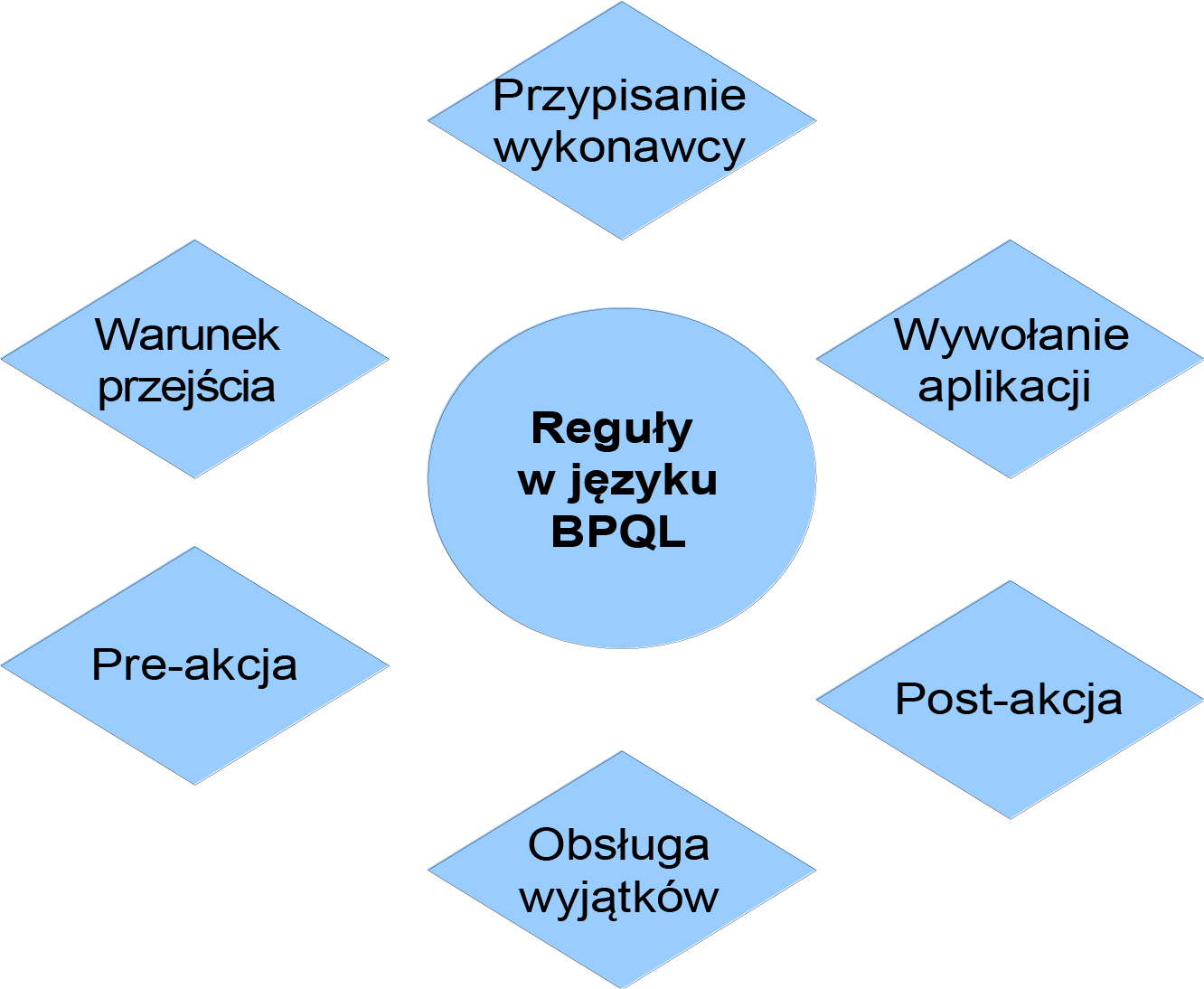
Figure 1: Areas of application of the BPQL
Assigning Performers
One of the key elements of the definition of an activity is the assignment of an performer. A given activity can be performed by one or more performers. In this context, the BPQL is used to define the selection of performers.
BPQL rules used for selecting performer have one significant limitation : the end result of such a rule must be a set of participants (single or multi-element). Consequently, the result of such a rule must be represented as a SET< Participant > type.
Selecting participants in BPQL involves consistently limiting the list of candidates along with adding subsequent requirements for the Participant. For example, let's assume that we want to select an employee who is a specialist in the organizational unit from ID '100419542' currently the least burdened. To do this, in the first step we will select all employees of the selected unit:
UsersFromList ( DepartmentUsers ('100419542'))
In the next step, we will narrow down the results of the above expression by adding another requirement for the position of the selected employees:
UsersFromList ( DepartmentUsers ('100419542')) /\ WM_Fun_hasPosition (' Specialist ')
In this case, the docuRob®WorkFlow system will calculate the product of the employee sets returned by the first function (employees of the indicated unit) and all employees of the organization employed in the position of Specialist . Thanks to this, we will receive as a result employees who simultaneously work in the indicated unit in the position of Specialist .
In the last step we will narrow down the obtained set of employees by selecting the least loaded employee. To do this, we use the previous results as an argument of the LeastLoadedPerformeCtx function :
LeastLoadedPerformerCtx(UsersFromList(DepartmentUsers('100419542')) /\ WM_Fun_hasPosition (' Specialist '))
As a result, we will get one employee. For now, our result cannot be used as an expression of Participant selection because it does not meet the basic assumption of not returning a set of participants. To make it correct, we need to "wrap" the result with the bag function that converts the Participant object to a single-element set of employees:
bag(
LeastLoadedPerformerCtx(UsersFromList(DepartmentUsers('100419542')) /\ WM_Fun_hasPosition (' Specialist '))
)
The result of the above query in BPQL is a valid expression of Participant selection.
If the Participant is to be an employee in the position of Specialist or Senior Specialist working in an organizational unit with the ID '100419542' or '100419684', we designate a set of potential performer as follows:
UsersFromList ( DepartmentUsers ('100419542,100419684')) /\ ( WM_Fun_hasPosition (' Older specialist ') \/ WM_Fun_hasPosition (' Specialist ') )
When selecting participants, conditional instructions are often used . For example, if we wanted to select the person approving the invoice and differentiate it depending on the amount of the invoice, we could do it as follows:
IF ($ amount < 1000) THEN
LeastLoadedPerformerCtx(UsersFromList(DepartmentUsers('100419542')) /\ WM_Fun_hasPosition (' Specialist '));
ELSE
LeastLoadedPerformerCtx(UsersFromList(DepartmentUsers('100419542')) /\ WM_Fun_hasPosition (' Older specialist '));
This rule maintains the principle of returning the value of a set of employees: both if the condition is met and if it is not met, a set of employees will be selected.
One of the most common mistakes is assuming that a block of statements can return a set of employees as a result of its operation. Unfortunately, currently a block of statements does not return any value. Therefore, it is not possible to use a block of statements as an element that returns a value for assigning employees. For example, the following BPQL rule is invalid . The system reports an error about the invalid returned result ([] versus [SET]).
IF ($ amount < 1000) THEN {
LeastLoadedPerformerCtx(UsersFromList(DepartmentUsers('100419542')) /\ WM_Fun_hasPosition (' Specialist '));
}
ELSE {
LeastLoadedPerformerCtx(UsersFromList(DepartmentUsers('100419542')) /\ WM_Fun_hasPosition (' Older specialist '));
}
Flow condition
Another important area of use of rules written in BPQL are transition conditions . These conditions are used to define the control flow in the process.
BPQL rules used to define transition conditions have one significant restriction: the end result of such a rule must be a logical value . Consequently, the result of such a rule must be represented as a Boolean type.
decision handling , one of the conditions after preliminary acceptance is to check whether the preliminary decision has the value accepted:
$preliminary_decision = 'accepted'
Of course, such an expression can be "complicated" as desired while maintaining the principle that the returned value is of the Boolean type:
$preliminary_decision = 'accepted' AND $amount < 1000
You can also consistently use a conditional statement in a transition condition:
IF ($amount < 1000) THEN
	$ preliminary_decision = 'accepted';
ELSE
$ preliminary_decision = 'preliminarily accepted';
On the other hand, for the same reasons as for the selection of a participant, it is not possible to use a block of instructions:
IF ($amount < 1000) THEN {
	$ preliminary_decision = 'accepted';
} ELSE
$ preliminary_decision = 'preliminarily accepted';
}
The error that appears is related to inconsistency in the returned results.
Pre and post-actions
Another element where BPQL rules can be used are the so-called pre and post actions . When defining rules for these actions, there are no restrictions on the values returned. Block statements, loops, and conditional statements are very often used here. An example of such an expression is given below:
IF ($amount > 1000) THEN {
 	$priority := 'HIGH';
	$risk := $risk *1.1;
} ELSE IF ($amount < 100){
 	$priority := 'LOW';
	$risk := $risk * 0.85;
} ELSE
 	$priority := 'NORMAL';
@beforePreAction
This is a special purpose construct used in the definition of pre-action . An example of such an expression is given below:
@beforePreAction{
 	$counter := $counter+1;
}
/*remaining pre-action code*/
The code contained in this block, unlike the rest of the pre-action , will be executed already during the creation of the action. In a situation where n performers of a given action are defined, the @beforePreAction block will be executed n times during the creation of the action (n instances of the action are created), while the rest of the pre-action will be executed once, immediately before the execution of the action.
Application and emergency handling parameters
When assigning application parameters called in activities and events handling exceptional situations, it is possible to use BPQL rules . This allows you to flexibly assign values to individual parameters of called applications.
The rules used for assignments have one restriction: they must return a value of type that is compatible with the type of the argument of the invoked application. For example, if the parameter x is text (of type String ), the following assignment is valid:
'x123' + $text_variable + Doc2String($XML_document )
but the expression below is no longer valid (it returns an integer value, not a text value):
123+ $integer_variable
In order to write the above expression, one needs to do an explicit type conversion:
Int2String(123) + $integer_variable )
The set of BPQL functions can be extended by providing your own implementations extending the base class WfWPAFunctionBase . The following code fragment shows an example BPQL function that returns to the server executing process instances a random selection of a potential performer of the action from the provided set of performers, within which the function was evaluated.
Adding new BPQL function implementations
The possibility of extending the semantics of BPQL rules introduced in the docuRob®WorkFlow platform by creating domain-specific functions is important both for process designers as well as the business users . In the latter case, the advantage is the possibility of easy interpretation of BPQL rules resulting from friendly terminology.
Implementation exemplary BPQL functions
public class SelectRandomParticipantCtx extends WfFunctionBase {
	public Vector getValue(Object connection, Vector paramList) throws Exception {
		// two parameters only - a set of performer and a number
		ParamListHelper.checkNumberOfParameter(paramList, 2);
		Vector participants = (Vector) paramList.get(0);
		Vector number = (Vector) paramList.get(1);
		String numberToSelect = (String) number.get(0);

		int numberOfParticipantsToSelect = 0;
		try {
			numberOfParticipantsToSelect = Integer.parseInt(numberToSelect);
		} catch (NumberFormatException e) {
			throw new Exception( "Cannot convert number of participants to integer [number to convert: "+ numberToSelect+"]" );
		}

		return selectRandomParticipant( participants, numberOfParticipantsToSelect );
	}

	protected Vector selectRandomParticipant( Vector participants, int numberToSelect ) {
		Vector selectedSet = new Vector( numberToSelect );
		Random random = new Random();

		for( int i=0; i<numberToSelect; i++ ) {
			WfWPAParticipant selectedParticipant = ( WfWPAParticipant ) participants.get ( random.nextInt ( participants.size () ) );
			selectedSet.add ( selectedParticipant );
		}

		return selectedSet ;
	}
}
In order for the BPQL function to be visible, it must be defined in the TB_ZF database table. The function description consists of the following attributes:
- ZF_ID – the next function identifier within the table
- ZF_NAME – function name (name of the class implementing the function)
- ZF_LICZBA_PARAM – number of function parameters
- ZF_PARAMETERS – data types of function parameters (separated by comma)
- ZF_DESCRIPTION – function description
- ZF_RESULT – the data type of the function result
- ZF_CLASS – full name of the class (including package) implementing the function
For the above function the description is as follows:
INSERT INTO TB_ZF (ZF_ID, ZF_NAME, ZF_NUMBER_OF_PARAMETERS, ZF_DESCRIPTION, ZF_RESULT, ZF_CLASS) VALUES ('35', ' SelectRandomParticipant ', 2, ' SET,String ', 'Random selection of a Performer from the set', 'SET', 'pl.rodan.ooworkflow.environment.resource.wpa.SelectRandomParticipant');